What it does
One app, the whole box.
Vitals, rescue and input for the machine under the TV: the parts you reach for from the couch.
Live dashboard
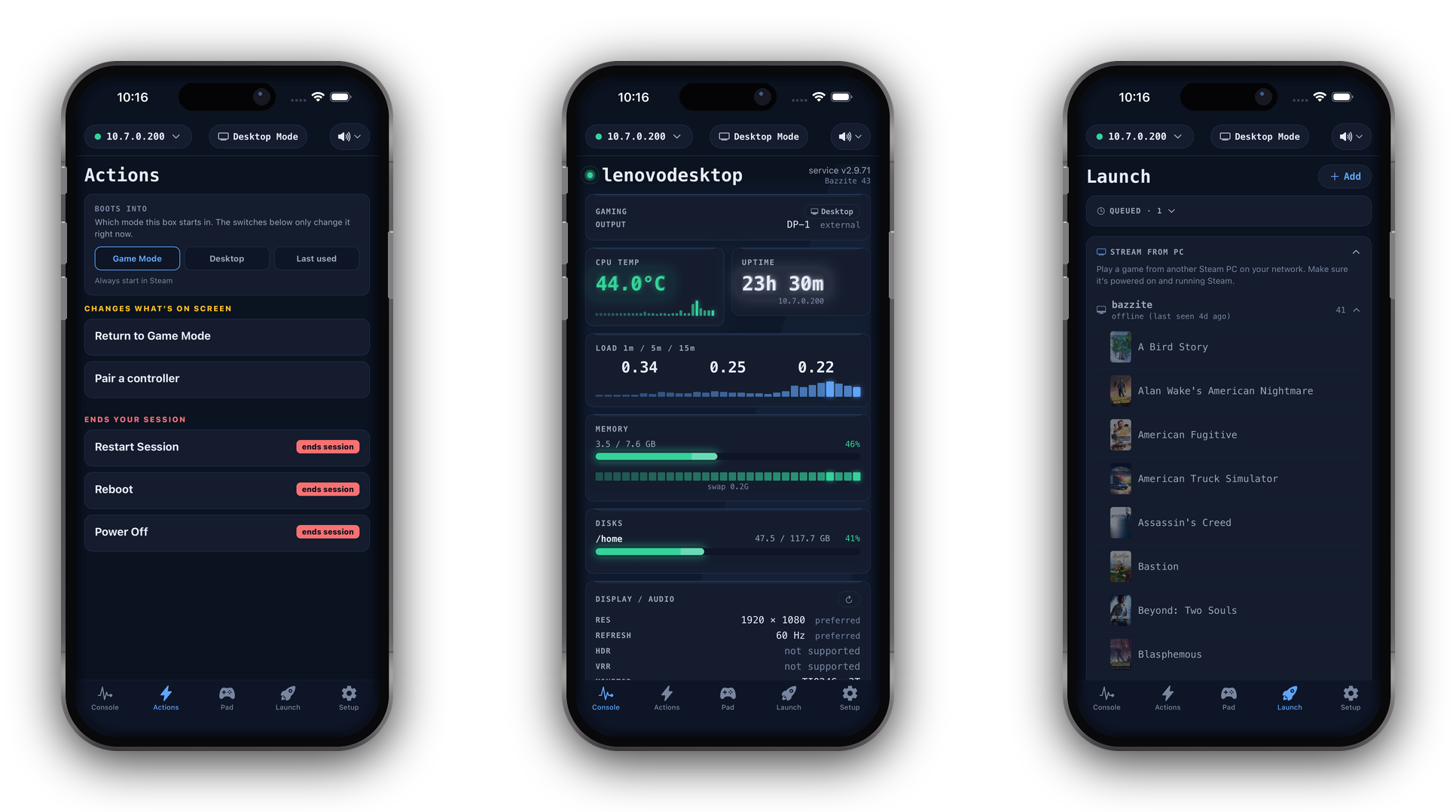
CPU temperature, load, memory, per-disk usage, uptime, and the health of every background service you watch (systemd on Linux, Windows services), refreshed every few seconds. Every GPU is reported (a two-GPU machine shows both, each with its own temperature and memory), and a Display / Audio panel reports the signal your box is really sending the TV: resolution, refresh rate, HDR, and which speaker is playing. CPU temperature reads straight off the kernel on Linux; on Windows it depends on the motherboard exposing a sensor, so some desktop boards show no reading.
Rescue actions
Restart the frozen display (a wedged gamescope black screen), reboot, or power off. One tap each, grouped by danger, with a double confirm on the destructive ones.
Desktop ⇄ Game Mode
Drop the box into the SteamOS desktop and flip back to Game Mode with one tap, no keyboard or mouse involved. Or hold the Guide button on a controller to trigger the handoff without the phone (opt-in per box). Make the quick tweak from the couch, then get back to playing.
Remote desktop
See and control your box's whole desktop from your phone. On a box that can hardware-encode video the picture is hardware-decoded H.264, smooth enough to work in rather than a slideshow. Move the pointer with a trackpad or tap where you want to click, type with a full keyboard, and turn the phone sideways for an edge-to-edge, Remote-Desktop-style view. Boxes that can't encode fall back to a still-frame view automatically. LAN-only, opt-in per box. (Linux / Wayland desktop.)
Audio output switch
Pick which device the box plays through, right from the couch: the TV over HDMI, a Bluetooth speaker, or the built-in output. One tap moves the sound there, including whatever is already playing. (Linux boxes with PipeWire / PulseAudio.)
Front-panel light
If your machine has a controllable front RGB or status LED, set its colour and brightness from the app, or turn it off. Match the room, or kill the glare during a movie.
Virtual controller
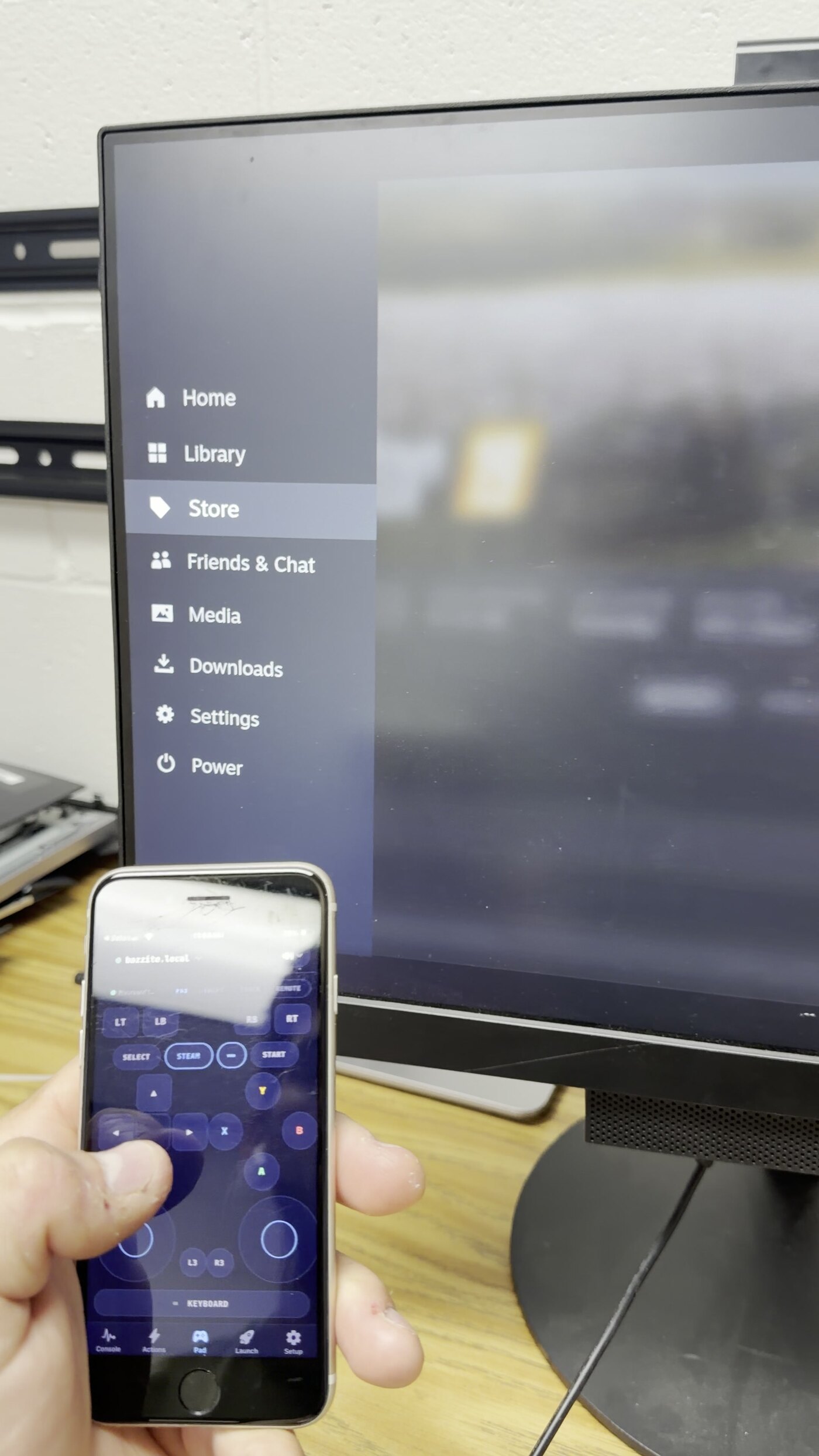
The service presents a standard Xbox controller to the box, so Steam and your games see genuine input: sticks, D-pad, ABXY, triggers, haptics. Handy when the real controller is dead or across the room. Turn the phone sideways for a full-screen, edge-to-edge gamepad, or switch to a one-handed MOVE mode: one big thumb zone driving the stick, built for auto-attack games like Vampire Survivors and Megabonk. Dozens of controller themes dress it up with a game-styled backdrop behind the buttons, and a palette button in the immersive view swaps them on the fly.
Swipe mode
An Apple-TV-remote-style surface: swipe to move, tap to select. The fastest way through Kodi and Big Picture menus from the couch.
Combos
Hold the keyboard button on the Pad for a panel of one-tap shortcuts: copy, paste and undo for the desktop, and the Kodi and media keys you reach for most: play/pause, context menu, info, back. No hunting through an on-screen keyboard from the couch. Opt in from Setup.
Log viewer
Browse recent error logs (journald / Windows Event Log) for any watched service straight from your phone, without an SSH session or squinting at the TV.
PIN pairing
Tap Scan for boxes, then type the PIN the box shows on its screen. There are no IP addresses and no tokens to copy. The QR the installer prints still works too.
TV & power control
Your TV, over Wi-Fi, with no HDMI-CEC required. Point Couchside at a smart TV on your network and you get a real remote: D-pad, OK/Back/Home, power, volume and the input/SOURCE key, plus an on-screen keyboard for those miserable TV search boxes. Couchside can also find the TVs on your network, so you never hunt for an IP. Works with LG webOS, Roku, Android / Google TV and Hisense; Samsung is in beta. (Smart-TV backends need a Linux box. On Windows, Roku is supported today.)
Your phone's own volume buttons work too, on every control screen. On the box side there is volume (a real drag slider on SteamOS) and mute, plus sleep and wake over the network; one awake box can even wake a sleeping one. HDMI-CEC still works where your box has it, as do commercial RS-232 panels like Newline. No CEC and no smart TV? A spare Raspberry Pi adds it via the one-line Pi CEC bridge installer.
Make it yours
Skins, colour packs and accents. Give the Console a new shape in Setup → Appearance. Pick from six skins (the quiet “Studio”, the machined “Panel”, a dense dashboard look and more), each shown as a live preview, then layer a colour pack (OLED Black, Steam, Nord, Dracula…) and an accent on top. An optional alarm pulse flags a hot vital from the corner of your eye. The look you have today doesn’t change until you touch it.
Decky Loader, from the couch
Install and manage Decky Loader and its plugins from your phone. Install, repair, update or remove Decky on the box, browse and add plugins from the official Decky store, and see what’s installed, all from Setup, with no Desktop Mode and no keyboard. You opt in once on the box; a box without Decky is left untouched.
Recorded on a real box
Watch it drive a TV.
A phone driving Steam Big Picture over home Wi-Fi: the menus, the input modes and the game library, from the couch. These clips were recorded on the box under the TV, not mocked up.