Run your gaming PC from the couch.
Couchside puts a remote and a controller for your living-room Linux gaming PC on your phone, with a live dashboard of the box beside them. When the TV goes black, your phone is the screen: see whether the box is alive, read the logs, restart the display, or pick up a virtual controller. None of it leaves your Wi-Fi.
steamdeck  ● online   os SteamOS 3.6  service 2.9.117  tls pinned  mode Game
cpu 47.0°C   batt 100% charging   mem 6.1 / 15.6 GB   /home 118 / 512 GB
display 1920×1080 @ 60 Hz · HDMI · docked   audio HDMI   uptime 9h 12m
Free for a week, then a one-time $7.99 unlock.
one payment · no subscription · no accounts · no ads · or build it yourself
● LIVE the real app, running in your browser against a mocked box
app 2.9.60 · web build · nothing here talks to a real machine
Install the service on the box.
One command. It installs a small stdlib-only Python service with no dependencies, prints a PIN and a QR, and stays running. Re-run it any time; it keeps your token and pairings.
Linux
$ curl -fsSL https://couchside.tv/install.sh | bashRead the script first → New Steam Deck? Run passwd once in Desktop Mode so the installer can ask for permission. With Decky Loader installed, the same command adds a Couchside panel to the Quick Access Menu.
Windows 10 / 11 beta
> irm https://couchside.tv/install.ps1 | iexPowerShell; it asks for admin via UAC. Read the script first → Linux came first and is the more polished of the two; the Windows service is newer, so file anything you hit. Unprivileged service, fixed allowlist, no root daemon.
Scan for your box, type the PIN
Open Couchside and tap Scan for boxes. The box shows a short PIN on its own screen; type it in and you are paired. No IP addresses or tokens to copy. The QR the installer prints works too.
Stay on the couch
Watch the vitals, restart a wedged display, tail the logs, or flip to the controller. You never have to go find a keyboard again.
Extra powers stay off by default
couchside allow-system-updates on, allow-updates, allow-launchers. Each is enabled only on the box, never from the phone, and each grants one fixed root-owned wrapper rather than a blank sudo. Details in the README →
What it does.
Vitals, rescue and input for the machine under the TV. The parts you reach for from the couch, one line each.
| Capability | Detail | Where |
|---|---|---|
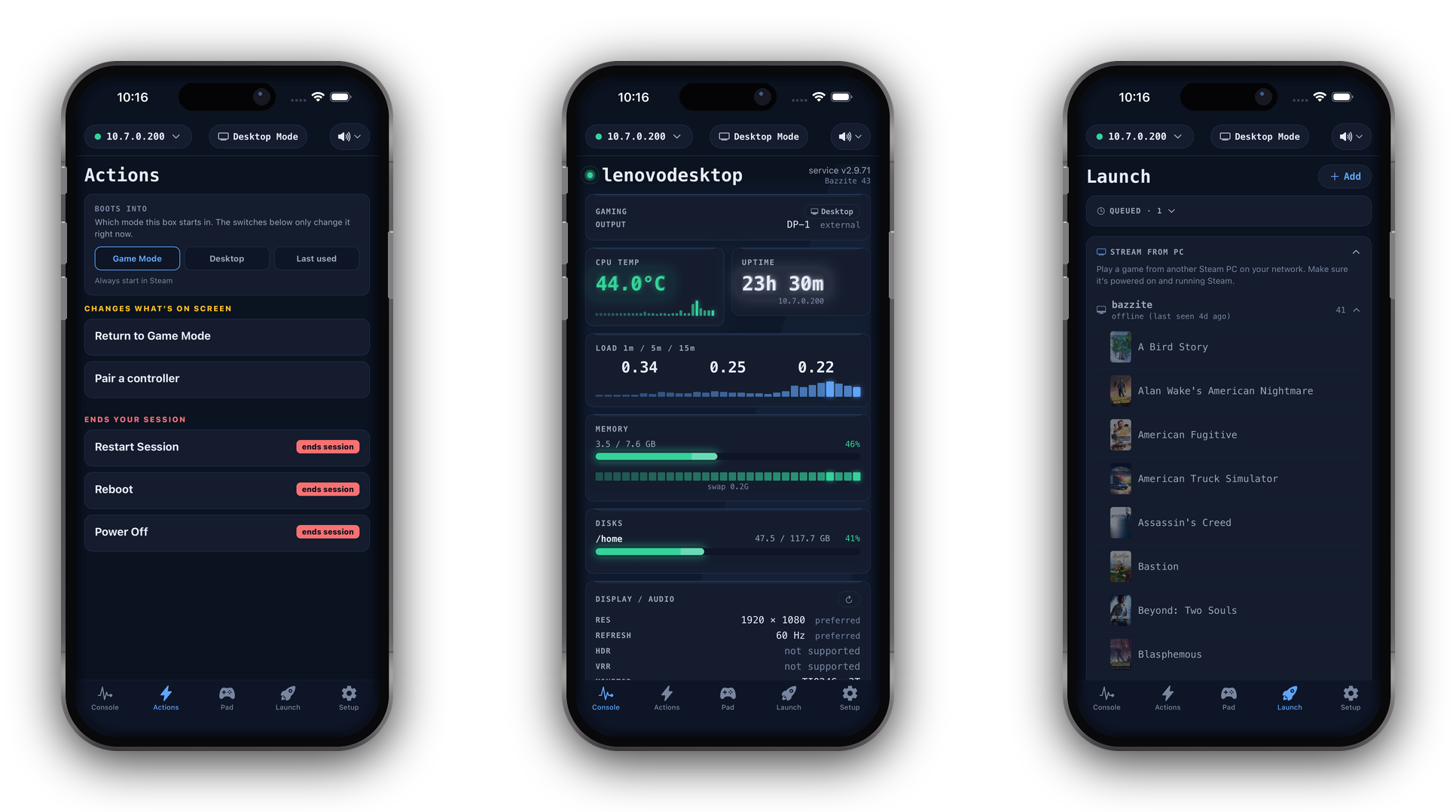
| Live dashboard | CPU temperature (Linux; on Windows it depends on the motherboard), load, memory, per-disk usage, uptime, every GPU, the Display / Audio signal actually going to the TV, and the health of every service you watch. Refreshed every few seconds. | linux · windows |
| Rescue actions | Restart the display session (the wedged gamescope black screen), reboot, power off. Grouped by danger, double confirm on the destructive ones. | linux · windows |
| Desktop ⇄ Game Mode | One tap either way, no keyboard or mouse. Optionally hold the Guide button on a controller to trigger the handoff without the phone. | steamos · bazzite |
| Virtual controller | A standard Xbox pad the box cannot tell from plastic: sticks, D-pad, ABXY, triggers, haptics. Landscape full-screen mode, a one-handed MOVE mode, and controller themes. | linux (uinput) · windows (ViGEmBus) |
| Swipe, trackpad, keyboard | An Apple-TV-style swipe surface for Kodi and Big Picture, a relative-mouse trackpad, and a keyboard that types straight into the box. Combos panel for copy, paste, undo and media keys. | linux · windows |
| Log viewer | Recent error logs for any watched service, from your phone, without an SSH session. | journald · event log |
| Pairing | PIN shown on the box's screen, or the QR the installer prints. No IP addresses, no tokens to copy. | all |
| TV and power | A real remote for a smart TV on your network: D-pad, OK/Back/Home, power, volume, input, an on-screen keyboard. LG webOS, Roku, Android / Google TV, Hisense; Samsung in beta. HDMI-CEC and RS-232 where the box has them; a spare Raspberry Pi adds CEC via the Pi bridge. Box-side volume, mute, sleep and wake. | linux (roku on windows) |
| Remote desktop | See and drive the whole desktop. Hardware-decoded H.264 where the box can encode, still frames where it cannot. Tap where you want to click. | linux / wayland · opt-in |
| Audio output | Move sound between HDMI, a Bluetooth speaker and the built-in output in one tap, including whatever is already playing. | pipewire / pulseaudio |
| Front-panel light | Colour, brightness, off. Light-bar sequences on hardware that has them. | where supported |
| Decky Loader | Install, repair, update or remove Decky and its plugins from Setup. Opt in once on the box; a box without Decky is left untouched. | steamos · bazzite |
| Skins and colour packs | Six skins with a live preview, colour packs (OLED Black, Steam, Nord, Dracula), accents, an optional alarm pulse for a hot vital. | app |
Recorded on a real box.
A phone driving Steam Big Picture over home Wi-Fi. Nothing mocked up.
What talks to what.
Tap a task to watch where the traffic goes. Then pull the internet cable and see what changes. (Spoiler: almost nothing.)
The app and the service speak plain HTTP with a bearer token, phone to box, on your Wi-Fi. Pick a task above to see exactly what moves where.
Pay once. Or don't pay at all.
The service on your box is fully open source (MIT). The app is source-available: read it, or build it onto your own phone for free for personal use. The one-time price buys the ready-made build from the stores, kept updated, and supports the work behind it.
“I love opening my phone, finding my favorite game, and hitting launch, so by the time I've walked over to my gaming spot it's loaded and ready to go. Once it fits your setup, you'll get it. That's why the unlock is one payment instead of another monthly bill.”Taylor, maker of Couchside
Try free for 7 days, then unlock once
Download it free and use every feature for a full week, no commitment. If it earns a spot in your living room, keep it forever. One payment, one time, no accounts. Everything is a subscription these days. I hate that, so Couchside isn't one. The money funds this project and supports my family.
Compile it from source
The app's full source is on GitHub: read it, compile it onto your own phone with Expo, tweak it for yourself. Source-available for personal, noncommercial use (PolyForm Noncommercial); the service and installer are MIT, so you can even build your own client. Same software, your labor instead of $7.99. All I ask is that you don't repackage and sell it.
It never leaves your network.
Couchside talks only to the service on your own LAN. There is no cloud in the middle, because there is no cloud at all.
- Token auth. A per-box bearer token minted on the box and stored in your phone's keychain. Only a paired phone can talk to the service;
couchside new-tokenrevokes every phone at once. - TLS, pinned at pairing. The service serves HTTPS with a self-signed certificate whose fingerprint rides the pairing QR. A box presenting a different key is treated as unreachable, never downgraded.
- Least privilege. The service runs an exact, audited allowlist of commands and nothing else. A client id is looked up, never interpolated;
subprocessis always an argv list. - No telemetry. No analytics, no crash reporting, no first-party endpoint at all. The only outbound traffic is GitHub for signed updates and the stores for the unlock.
- Auditable. The service is MIT and a single stdlib-only Python file. The app's source is public too. The security page also says what this design does not protect against.
curl http://YOUR-BOX.local:8787/api/pingThe discovery surface: version, hostname, ports, fingerprints. No token, no control.
curl -i http://YOUR-BOX.local:8787/api/statusReturns 401. Everything that changes state needs the bearer token.
What people are saying.
Real reviews from the App Store and Google Play, shown word for word. Names removed; the full, unfiltered ratings live on the stores.